Wednesday, February 23, 2011

OECD Publications Added

The Organization for Economic Co-operation and Development, or OECD, was established in 1961 on the basis of the Organisation for European Economic Cooperation (OEEC), set up to run the Marshall Plan to help rebuild Europe after World War II. Today, there are 34 OECD member states. Its mission is to "... promote policies that will improve the economic and social well-being of people around the world".

Part of this mission is to create and share information. The AUR Library has added a new part to the Electronic Books Section of the Extend Search, which searches tens of thousands of books published by the OECD. (For more information on the Extend Search, see the Two-Minute Tutorial)

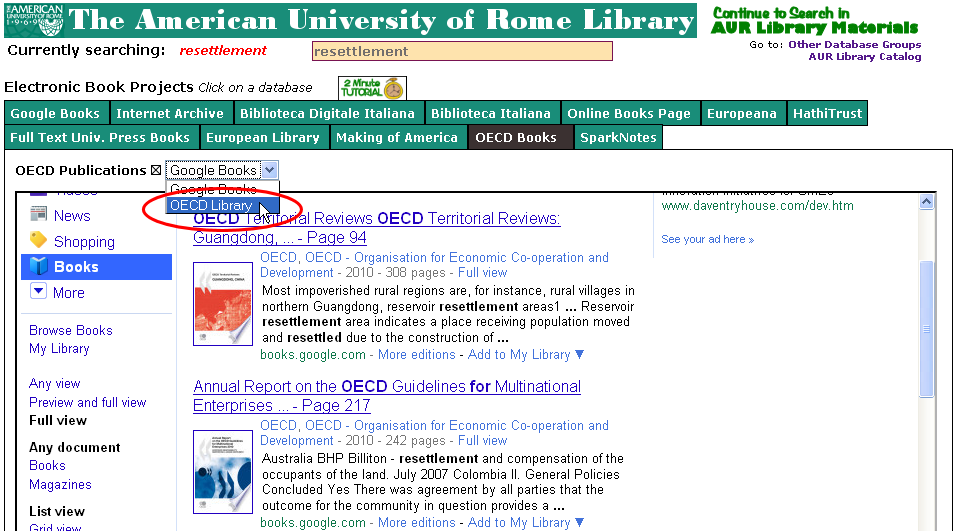
You will notice a new part: OECD Books.


When you click on it, you will be looking at the full-text books authored by the OECD that are in Google Books, which is the default search. You can also search the OECD Library site by clicking on the drop down box and selecting OECD Library.

When you click on this, you will be searching the electronic books hosted by the OECD Library.


Not all of the electronic books are available for free, but very many are. To find out, find if the the record has an option Look Inside which allows you to download a copy that you can read but not print.

Wednesday, February 02, 2011

Google Art Project

Google has collaborated with some of the most famous art museums in the world to create an amazing site: the Google Art Project.

They have modified Google Street View to provide virtual "walking tours" of each museum, and when you see a work with a plus sign on it, you can see a very high resolution image. As only one example, here is Caravaggio's Medusa at the Uffizi in Florence. You can zoom in to reveal the rich details of Caravaggio's painting, but in the right hand column, you can click on additional notes, tags, and so on. If you click on "More works by this artist" you can go to the other works of Caravaggio in this project, at the Uffizi and in the other museums.

Sometimes, you can experience even more. At the National Gallery, you can see Holbein's "The Ambassadors" and in the right hand column, you will see "Media". When you click on that, you will see videos about the work of art.

To get started, please look at the Visitor Guide.

The AUR Library has included the Google Art Project in the Extend Search mechanism in the section "Art Images". Here is a search for Vermeer. For more information on AUR Library's Extend Search, see the Two-Minute Tutorial.

Tuesday, February 01, 2011

Updates to the AUR Library Catalog

We have made three major additions to the materials available through the AUR Library.
  1. We have added a tool to find the latest Book Reviews from the major book review sites from the US and UK The AUR Library has built similar pages: all you have to do is select the newspaper, magazine or website, and then click on anything of interest.

    You can get to this page by going through the drop-down list available on any page of the Library Catalog, selecting Browsing → News → Book Reviews.

  2. We have also added an extra database for searching through the Extend Search method, included in the Articles and Open Archives section. This is a British database and is called JURN.

    Although we are still not sure what JURN stands for, it describes itself as:
    ...a search-engine dedicated to indexing free ‘open access’ ejournals in the arts and humanities, along with other arts and scholarly publications offering free content. 
    Even though it uses a Google Custom Search Engine, you can often get better results using JURN rather than Google or Google Scholar, and the editors work very hard to make sure that you will get free materials. Included are book chapters, too!

  3. We have created a page that searches the latest tables of contents of several thousand scholarly journals using the Journals TOCs service from the Institute for Computer Based Learning at Herriot-Watt University. You can activate it in two ways: in the drop-down menu from any page of the catalog under: Browsing → Magazine Rack → Journal TOCs, or through the Extend Search → Articles and Open Archives → Journal TOCs.

Please give all these tools a try and tell us what you think.

Monday, January 31, 2011

Welcome to the AUR Library!

The new semester is starting. To get a quick understanding of what is available to you as a student at AUR, it is probably best to look at some of the Two-Minute Tutorials. These are very quick overviews (two minutes or less!) of some of the most important information you need to get started to use information materials as effectively as possible. It is probably best to start with the following:
 Also, the AUR Library Catalog always has a Featured Resource. This one is on a series of interviews between Alfred Hitchcock and François Truffaut.

Welcome!

Friday, November 19, 2010

How Google Works

Here is a great "Infographic" that explains what goes on behind the scenes at Google. It's pretty self-explanatory.

How Google Works.

Friday, November 12, 2010

New Featured Resource: Animal Farm (the Movie)

We have a new featured resource, a video available in Youtube of the first movie version of George Orwell's Animal Farm. It turns out that this version involved a special office of the CIA, that even rewrote some of Orwell's story! The story is there, along with links to articles and lectures talking about it.

Also, there are links to propaganda films available in the Internet Archive, such as the famous "Duck and Cover" short for children, featuring Bert the Turtle, who teaches children how to save themselves from injury during a nuclear attack!

Bert the Turtle about to Duck and Cover

Wednesday, November 10, 2010

"Latest News for Archaeology" Search Tool

We have just created another of our news feeds, this one for the area of Archaeology. It searches some of the major sites on the web that provide the latest news in Archaeology, returns an RSS feed, reformats it and provides it to you.


You can access this news feed from any page in the AUR Library Catalog, by going to Browsing, the selecting News and Archaeology. All you do then is simply select the sites you are interested in and then click on Latest News.You can select from a lot of other areas, too.

Tell us what you think, or if you have an idea for another site,

Tuesday, October 26, 2010

More changes to Extend Search: Government Documents

Based on feedback from some students and faculty, the AUR Library has added a couple of extra databases to search in the Extend Search function for Government Documents: the Congressional Record and TSO. The U.S. Congressional Record is the official record of the debates in Congress, and includes a section called Extension of Remarks, which can be anything: speeches and poems, and all kinds of other things.

The early issues of the Congressional Record (1774-1875) have also been digitized and can be found through the AUR Library Catalog.

The other database is TSO, or The Stationery Office of the British government. It includes Command Papers, House of Commons Papers and key Departmental papers. For more information, see their About page.

Here is an illustration of how it works, use the Extend Search to search for "elections in Iraq". From here you can select TSO and/or Congressional Record and the search will have been done. Of course, there are other options as well.

Please note that in the Congressional Record, the default search is for 2010, but there is a drop down box above it where you can select other years.

Wednesday, September 29, 2010

Changes in Extend Search: American Philosophical Society Publications

We have added a new possibility in the Extend Search for the Electronic Book Projects. For some time, one option has been to select Full-Text University Press Books, which actually searches Google Books and automatically limits your search to freely accessible full-text books, published by a university press.

We have added an additional drop-down box after you select this option. The default is still to search "university press" publishers, but you can now select free books published by the well-respected American Philosophical Society, founded by Benjamin Franklin himself. The Society publishes in all fields, and not just "philosophy".

Here is an example search using the Extend Search for Michelangelo. When you click on Full-Text University Press Books, you will be viewing the full-text books published by various university presses in the world. Not all are in English. But in the drop down box, there is now the option for American Philosophical Society. Select it, wait a few seconds, and their publications will appear. You can sort and limit the results in the normal ways in Google Books. 

Let us know what you think!

Tuesday, September 28, 2010

Project Syndicate Added to Op-Ed Search

We have added a new site to the page that allows you to find what is currently being discussed in the opinion and editorial pages of some of the major newspapers and magazines around the world. This site is called Project Syndicate and provides access to many opinions and articles by some of the leading thinkers.

AUR Library's Latest Opinion Pages provides a quick and easy way to find out what even more "movers and shakers" around the world are currently writing. Just select an area of the world in the menu on the left and select the site that interests you. There is also the possibility to get an instant translation through Google Translate by clicking on .

Be careful of bizarre translations, however! The idea of adding Google Translate is simply to provide an idea of what a web page in another language is saying, not an exact or even accurate translation.

If you have a suggestion for a new site to add, please let us know!

Friday, September 24, 2010

Google Translate Added to the AUR Library Catalog

The AUR Library Catalog has added a new function: to get an almost immediate translation using Google Translate.


It is very simple to use. On the opening page, as well as on pages for individual resources, you will see a drop-down box that allows you to search the language you want. You can watch as the page is translated into the language you choose, as if by magic!

Since all of this comes from Google's servers, and lives "in the cloud", you may have to wait for a second or two for the box to load, or for the translate to work, but give it a try, and tell us how you like it.

Be aware that the AUR Library uses Google Translate in other ways as well, for example, in the Italian newspapers page, and in the Op-Ed pages. We've added it this this blog, as well.

Thursday, September 23, 2010

Welcome and the Latest Enhancements

Welcome to the AUR Library!

We have made some enhancements, two are available through the catalog:
  1. You can now resort your search by publication date, by clicking on either Ascending or Descending. Of course, Ascending gives you the results by publication date with the earliest items first, and Descending with the newest items first. Remember you can also see the latest items added into the collection by going to the drop-down menu, choosing Browsing --> Latest additions and then selecting the format you are interested in.
  2. We have made a change to the Extend Search for the Electronic Books Projects, which now searches Google Books in specific ways to find full-text copies of books published by University Presses. See an example search for Mussolini. Click on "Full Text Univ. Press Books." There will be other methods as well.
Available through the catalog, but separate from it, is the page to get the Latest News in International Relations. We have begun an experiment using a method to provide the latest 50 items added to Google Scholar using specific terms: International Relations, Political science, and Human Rights.

Let us know if it's useful or not.

Finally, remember the Two-Minute Tutorials that will give you a quick overview of what the library has. The most important to get that quick overview are:
These tutorials are all supposed to be Two-Minutes or less, so if something seems to be too long, let us know!

    Tuesday, July 06, 2010

    Enhancement to the Catalog: Most Checked Out Materials

    We have made a series of new lists that may be of interest to the AUR Library community: lists of the 100 most checked-out materials for each semester from 2007.

    You can get to these lists by going to the AUR Library Catalog page, going to the drop-down menu, selecting Browsing and Catalog, and you will see the option Most Checked Out.

    Let us know what you think.

    Friday, July 02, 2010

    Search Within Citing Articles in Google Scholar

    A very important improvement has just been announced by Google. One of the major advantages of using Google Scholar is to be able to find later articles that cite the article you are interested in. Many people have been asking for Google to allow you to search only within these specific articles, and now it does. This should make everyone's researching much easier.

    How does it work? It's very simple. When you do a search in Google Scholar, either directly or using AUR Library's Extend Search tool, you will always see how many articles cited the article later.

    In this example, the article Has feminism changed archaeology? by MW Conkey was published in 2003 and since then has been cited in 22 other articles. When you click on the Cited by link, it will show you the citations.

    We see here that the previous article was cited in a book entitled Science and social inequality by S. Harding from 2006, among the 22 others. Google's improvement is to add a click box at the top so that you can limit your search to only within the articles that cited the original article, and not the entire Google Scholar database.

    For more information on using Google Scholar, see the page in the AUR Library Information Wiki.
    Friday, June 25, 2010

    Featured Resource: The Aztec Pantheon and the Art of Empire

    Our new Featured Resource is a website created by the J. Paul Getty Museum that "considers the Spanish conquest of Mexico, [and] European attempts to interpret Aztec civilization through the lens of classical culture, and comparative approaches to the monumental art of empire."

    It's a beautiful website, highly interactive with lots of information. You can see it through the main page of the AUR Library Catalog.

    Thursday, June 03, 2010

    New Public Lecture Site Added

    We have added a new public lecture site to the Online Public Lectures search tool. Now, you can see the latest lectures given at the world famous Institute for Advanced Study, next to Princeton University.


    The Institute has always been one of the greatest research institutions in the world, boasting such faculty as Albert Einstein, Robert Oppenheimer, Kurt Gödel, Irwin Panofsky, and George Kennan, to mention just a few.

    You will find all sorts of topics covered in these lectures. For example, the latest one now is Experiments on Animals in Ancient Greece and Rome: Private and Public Science.

    You can access AUR Library's Public Lectures search tool from any page in the library catalog, by clicking on Browsing on the menu, then Webcasts and Online Public Lectures (shown above) and then you can select Institute for Advanced Study, or one of the other options.

    You can search by keyword, too!

    Tuesday, May 25, 2010

    Firefox Plugin for the Extend Search

    If you like the ease and utility of AUR Library's Extend Search tool, we have tried a new experiment to allow you to use it not only within the local catalog, but over the entire web!

    The current version works only in Firefox and uses a special plugin. Once you install it, you will be able to select text from any webpage and it will be searched automatically in the Extend Search function.

    To begin using it, see the installation instructions. It only takes a few seconds to install.

    Let us know what you think and how it can be improved.

    Thursday, April 22, 2010

    Sharing to Facebook and Other Social Accounts Enabled in the Catalog

    We have just implemented a method to share records in the AUR Library Catalog to your Facebook, Twitter, Blog etc. account, We did it using the AddThis button.

    When you get to any record in the catalog, you will see

    in the right hand-column, and you can use this to make a link into whatever account you may use. Take a look at this record and you will see it under the image of the book cover.

    Let us know if you like it!

    Monday, April 19, 2010

    New Featured Resource: Who Protects Antiquity?

    We have added a new Featured Resource to the catalog: Who Protects Antiquity? was a forum held just a few days ago at the Graduate Center of CUNY, among four distinguished archaeologists who debated the contentious issue of cultural preservation today. Some of their topics are "How nationalism interferes with archaeology," "Current methods for discouraging looting," "The myriad causes of archaological destruction" and many others. There is also a lively Question & Answer sesssion after the main talk.

    The Featured Resource also provides a few handy links into the AUR Library catalog and into some particularly useful sources on the web.

    Don'f forget our Archive of Featured Resources, which has all of our previous Featured Resources.

    Tuesday, April 13, 2010

    Update to Browse the Catalog

    Do you like to browse the shelves of a bookstore or library? Almost everybody does. It's an interesting and highly personal way to get to know what is on particular bookshelves.

    Unfortunately, it turns out that browsing the shelves has never been one of the better ways to find information. You wind up missing lots of materials because you cannot always be sure that everything on your topic is placed together on the shelves. There are many reasons why physical books that you might consider to be on a single topic may not be shelved together. (For more information, see the section on Browsing in the AUR Library Information Wiki)

    This is the way it has always been, since the days of the ancient Egyptian Empire and the Library of Alexandria, but it is especially true today since there are all kinds of electronic resources that can never exist on any bookshelves at all. The AUR Library Catalog has attempted to fix this however. We have created a method to Browse the Catalog for related items, which we have just updated.

    As you see, it's still not a really easy task, but if you read the instructions, it should be much easier. The AUR Library has two classification systems: the Dewey Decimal System (Dewey), and the Library of Congress Classification (LC) and you will need to click on Conversion to Dewey or Conversion to LC to browse everything. Let's see how this works.

    Let's say that you are browsing and find that you are interested in Ethics. When browsing the LC numbers you discover that you can click on BJ - Ethics and browse the catalog for our reoords on ethics, either in book form or in electronic form. But you can also click on Conversion to Dewey and discover that in the Dewey Classification, ethics is 170. Now, you are browsing everything in the catalog on ethics. This is because the records in the catalog contain either the Dewey numbers or the LC numbers or both.

    There are still other resources that are not available in this way, primarily the big databases of journal articles. Why aren't they included? Because they don't have the LC or Dewey Classification numbers at all, so there is nothing to search. For these materials, you must use other methods. To find out how to search these resources (and more) check out our section on How to Find Information in the AUR Library Information Wiki.
