
Monday, March 31, 2008
Second Issue of AUR Library Newsletter
The second issue of the AUR Library Newsletter has just been issued. In it is announced some of the new initiatives: the Google Book Search, the Virtual Exhibition, the online documentaries and other information.


Monday, March 17, 2008
Link to Scans in Google Book Search from the AUR Library Catalog
 AUR Library has added links from the catalog to scans in Google Book Search. This will allow you to view the scans made by Google of their 10,000,000 book library project. When you find a record for a book in our catalog, the catalog sends out a request to Google, where it will determine if the scan exists or not. If it does, then a link will appear in the AUR catalog, with the image to the right.
(The Google Book Search program is highly controversial. For an overview, see: Devichand, By Mukul Devichand Is Google really flouting copyright law? BBC News, 9 March 2007)
There are several caveats with this service, and they are discussed in the related page in the AUR Library Information Wiki. For example, most of the time you cannot see the entire book, but only selections. Still, this should be of help to people to get an idea of the book, to be able to read parts when the physical copy is checked out or otherwise unavailable. The text can be searched, too.
Here is an example from the catalog.
Tuesday, March 11, 2008
New Plugin Allows You to Search the AUR Catalog
The AUR Library has created a search bar plugin that allows you to search the AUR catalog from the search bars that are in your browser. Installation is very simple. All you have to do is go to the AUR Catalog Plugin Page and click on the link. It will automatically add the AUR catalog to your search bar.
What is this all about?
There normally are search bars in your browser where you can search, e.g. Google without having to type in the URL and to enter the search in the text box there. For example, the search bar in the following image will search Google for the word "open". Or, you can select "Yahoo" or "Ebay." (These are the default search engines) After you install the AUR plugin, you will see it added to the list.

There is a separate plugin to add the AUR catalog to the "Google Search bar." You have to look farther down in the list, though.

In both cases, enter your search terms, click "AUR Catalog" and you will be searching our catalog.
What is this all about?
There normally are search bars in your browser where you can search, e.g. Google without having to type in the URL and to enter the search in the text box there. For example, the search bar in the following image will search Google for the word "open". Or, you can select "Yahoo" or "Ebay." (These are the default search engines) After you install the AUR plugin, you will see it added to the list.

There is a separate plugin to add the AUR catalog to the "Google Search bar." You have to look farther down in the list, though.

In both cases, enter your search terms, click "AUR Catalog" and you will be searching our catalog.
Friday, March 07, 2008
AUR Library Holds its First Virtual Exhibition!

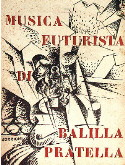
A book from The Italian Futurist Book exhibition held at Colophon Page
AUR has a very small physical collection, but the number of materials on the World Wide Web is enormous and growing daily. These materials are very important and interesting for our users, but how are they to know about them? The AUR Library places many of these items into its catalog, but it has just finished an exhibition of many of these valuable materials on the web. Therefore, it can be thought of more like an "exhibition of exhibitions."
The purpose of our exhibition is to let our library users know of the existence of some of these wonderful sites dealing with various aspects of the topics of Rome and/or Italy. Many of them are "virtual exhibitions" of other libraries, but there are other ingenious projects undertaken by librarians, scholars, and scholarly organizations.
We plan to add other exhibitions in the future on other topics.
Thursday, March 06, 2008
AUR and the Open Access Movement
 AUR has created a genuine Open Archive, which means that we have joined the Open Access movement. Open Archives and Open Access are the most exciting developments in the field of scholarly publishing today. This makes it easier for both faculty and students to share their researches and other creative work in an efficient and controlled way. For much more information, see the announcement.
Go to: the main page for the AUR Open Archive.
Wednesday, February 20, 2008
Free e-books through Gutenberg-e!
As the World Wide Web continues to expand, there is more and more ferment in the world of scholarly publishing. A person who has been especially busy is one of the great historians of the book, Robert Darnton, who has recently become the head of the library at Harvard University. Recently, it was announced that a number of books selected by the American Historical Association are now being made available through Open Access publishing.
Anyway, HOW DO I FIND THESE MATERIALS?
There is a list available from the AHA, but I have discovered that they are also findable through WorldCat, by searching "gutenberg-e.org" as a keyword. Currently, there are only 52 titles, but they are on all different topics, from art to culture to radium. Click on the link that says
Web Resources: gutenberg-e.org

There will probably be easier ways to find these materials in the future. They are supposed to be included in the Humanities E-Book project (AUR has a subscription), but they don't seem to be there yet.
AUR is making its own attempts at open access publishing and we hope to make an announcement soon.
For more information on the history of scholarly publishing and how it is changing, see The Scholarly Publication Process from the AUR Library Information Wiki.The official announcement is on the homepage of the American Historical Society. Many people feel that open access publishing is unsustainable, but others feel that it is the unstoppable wave of the future. The announcement makes these problems clear.
Anyway, HOW DO I FIND THESE MATERIALS?
There is a list available from the AHA, but I have discovered that they are also findable through WorldCat, by searching "gutenberg-e.org" as a keyword. Currently, there are only 52 titles, but they are on all different topics, from art to culture to radium. Click on the link that says
Web Resources: gutenberg-e.org

There will probably be easier ways to find these materials in the future. They are supposed to be included in the Humanities E-Book project (AUR has a subscription), but they don't seem to be there yet.
AUR is making its own attempts at open access publishing and we hope to make an announcement soon.
Wednesday, February 13, 2008
First Issue of the AUR Library Newsletter

The first issue of the AUR Library's newsletter has been issued. There is a lot of news about some of initiatives we are taking. It also points out some pages of interest in the Library Information Wiki.
Download a version at the AUR Library Newsletter homepage.

Monday, February 11, 2008
Search All Catalogs in Rome with One Search!
We have added the last of the major catalogs in Rome to our Extend Search section of the catalog: the combined catalog of the Senate Library and the Chamber of Deputies. As with all of the other Extend Search options, select the search that you want to do, enter the text (or select it when possible), click Find, and a new window will open up with the search results.
 Now, by selecting the options under Roman libraries, you can search all the books in all the major libraries in Rome that are available to you.
 Now, by selecting the options under Roman libraries, you can search all the books in all the major libraries in Rome that are available to you.
- Don't forget to click on the name of the catalog to get more information about searching, access information, and links to the websites of the individual libraries.
Tuesday, February 05, 2008
New Resources from Intute
 We have added a search box to search Intute, a free online service that "provides access to the very best Web resources for education and research. The service is created by a network of UK universities and partners. Subject specialists select and evaluate the websites in our database and write high quality descriptions of the resources." The database currently has over 120,000 records. To search Intute (and lots of other databases) use the Extend Search function in the catalog.
Thursday, January 24, 2008
New Semester, New Resources
Welcome to all our new students and faculty. Please feel free to participate in this blog and to see some of the postings that discuss the new projects going on.
There are a couple of new resources we have built that may be of interest. One is an extension of our News Feeds, which is a selection of Online popular magazines. The selection is primarily from the list compiled by the Chronicle of Higher Education's Art & Letters Daily. They have been organized very roughly by subject.
Another new development is to the Extend Search in the Library catalog, where an excellent resource was added: Intute. According to their site, it is "a free online service providing you with access to the very best Web resources for education and research. The service is created by a network of UK universities and partners. Subject specialists select and evaluate the websites in our database and write high quality descriptions of the resources." It has shown to be an excellent resource.
For more information about the Extend Search capability in the AUR library catalog, see the AUR Information Wiki.
There are a couple of new resources we have built that may be of interest. One is an extension of our News Feeds, which is a selection of Online popular magazines. The selection is primarily from the list compiled by the Chronicle of Higher Education's Art & Letters Daily. They have been organized very roughly by subject.
Another new development is to the Extend Search in the Library catalog, where an excellent resource was added: Intute. According to their site, it is "a free online service providing you with access to the very best Web resources for education and research. The service is created by a network of UK universities and partners. Subject specialists select and evaluate the websites in our database and write high quality descriptions of the resources." It has shown to be an excellent resource.
For more information about the Extend Search capability in the AUR library catalog, see the AUR Information Wiki.
Wednesday, December 05, 2007
Audio Books
Getting tired of listening to loud music on your Ipod all day long? There is a choice. There are many free items that you can download to your Ipod and listen to. The AUR Library Catalog helps you to do this in several ways.
Audiobooks
Audiobooks
- These are books that you can listen to. Many of these can be bought from Amazon.com or other websites, but there are many free ones as well, where volunteers read their favorite books. If you want, you can participate as well. AUR has cataloged only a couple of these websites, but they have a good number of books.
- These are all books that are in the public domain, so there is Arthur Conan Doyle, but not Stephen King.
- Want to take ANOTHER class? There are a lot of free ones on the web (for not credit, of course!)
- You can "attend" the class when they take a video of it and put it on the web the next day. The best one is at UC Berkeley where you can watch the class as if you were there. Some of these are audio only.
- Course materials
- Another development is something called OpenSourceWare, where education institutions agree to share their education materials. The two major contributors at this moment are at Open CourseWare Consortium and The World Lecture Hall, both of which include course materials from around the world. If you want to take a course in economics as taught in Vietnam, the materials and lecture notes are all there.
Monday, November 05, 2007
Webcasts & Podcasts
Some of the best parts of going to a university is that you can listen to lectures by some of the greatest experts in the world. Sometimes these are lectures by the local faculty, but they also may be lectures by visiting experts. To hear these lectures just a few years, you had to be at the university and sitting in the right place at the right time. Today, it's completely different.
Many universities and other organizations are recording their public lectures and putting them online for others to watch for free. The topics range everywhere: from architects discussing the latest matters, to politics, to philosophy, popular culture and so on.
How do I find these webcasts and podcasts?

AUR has added some of these sites to its catalog. The easiest way to find these records is just to go to the main page of the catalog and click Webcasts & Podcasts. From these records, you can go to the sites selected by the AUR library. Many of them are from universities around the world (e.g. Harvard, the New School, MIT, etc.) but others are from scholarly institutions, such as The Royal Society in London, or the Library of Congress. Still others are from news organizations, such as Frontline, or from think tanks.
Unfortunately, AUR can only make these materials available at an institutional level, that is, it answers questions such as "What are the latest webcasts from Princeton University?" but if you want to search specific webcasts by subject or author, you should try University Channel and/or LearnOutLoud.com where they attempt to allow you to search for individual webcasts by subject or author. LearnOutLoud.com includes many materials that you have to pay for, but you can click on Freestuff at the top. These sites do not add all that AUR has added, however.
Finally, most of these lectures can be downloaded to an Ipod.
Many universities and other organizations are recording their public lectures and putting them online for others to watch for free. The topics range everywhere: from architects discussing the latest matters, to politics, to philosophy, popular culture and so on.
How do I find these webcasts and podcasts?

AUR has added some of these sites to its catalog. The easiest way to find these records is just to go to the main page of the catalog and click Webcasts & Podcasts. From these records, you can go to the sites selected by the AUR library. Many of them are from universities around the world (e.g. Harvard, the New School, MIT, etc.) but others are from scholarly institutions, such as The Royal Society in London, or the Library of Congress. Still others are from news organizations, such as Frontline, or from think tanks.
Unfortunately, AUR can only make these materials available at an institutional level, that is, it answers questions such as "What are the latest webcasts from Princeton University?" but if you want to search specific webcasts by subject or author, you should try University Channel and/or LearnOutLoud.com where they attempt to allow you to search for individual webcasts by subject or author. LearnOutLoud.com includes many materials that you have to pay for, but you can click on Freestuff at the top. These sites do not add all that AUR has added, however.
Finally, most of these lectures can be downloaded to an Ipod.
Thursday, October 18, 2007
Think tank publications
When you are doing your research, don't forget to check the Think Tank publications.
What is a think tank? It is an institution that publishes information on a whole variety of topics, mostly trying to influence policy decisions. Normally, a think tank has a specific viewpoint: liberal or conservative. Their publications are normally biased toward one side or another, but they are reliable works and collected by every library.
Luckily, many of these think tanks are putting their resources on line for free! AUR is cataloging them and you can see the discussion on the Wiki here. And don't forget about the reports from the Congressional Research Service from the Library of Congress! They are on many topics and are made to be concise and easy to read.
What is a think tank? It is an institution that publishes information on a whole variety of topics, mostly trying to influence policy decisions. Normally, a think tank has a specific viewpoint: liberal or conservative. Their publications are normally biased toward one side or another, but they are reliable works and collected by every library.
Luckily, many of these think tanks are putting their resources on line for free! AUR is cataloging them and you can see the discussion on the Wiki here. And don't forget about the reports from the Congressional Research Service from the Library of Congress! They are on many topics and are made to be concise and easy to read.
Tuesday, August 28, 2007
New Place, New Catalog, New Everything!
 This semester is going to be one of changes. First, we have a beautiful, new library very close to the main campus. There are gorgeous grounds, and lots of space for more books. We have ideas for how to use this space to the best benefit of the students, but please, give us some ideas!
We also have upgraded the look of our catalog, so it looks completely different. It is designed to work with the catalogs of other libraries in Rome and in the world, as well as to help you surf the materials in the World Wide Web more effectively. It also works with the Library Information Wiki, which has lots of information designed to help you.
There are now online workshops on Information Literacy and Citations.
Monday, April 30, 2007
Finding Images
We have made a new research guide about finding images on the web. You can find it at http://www.galileo.aur.it/opac-tmpl/npl/en/pages/images.html.
It has some of the best research guides on finding images that we have found, plus an excellent article from Information Today entitled "Looking for Good Art." There are a lot of images on the web. Of course, what you can download is often lower-quality, and you would still need to get permission if you formally published them.
And don't forget to give the proper citations!
It has some of the best research guides on finding images that we have found, plus an excellent article from Information Today entitled "Looking for Good Art." There are a lot of images on the web. Of course, what you can download is often lower-quality, and you would still need to get permission if you formally published them.
And don't forget to give the proper citations!
Wednesday, March 14, 2007
Citations and Their Power
Citations and Their Power
It is important to cite your sources for a couple of important reasons: to avoid plagiarism, and to let others know where you found the source of your information. But in addition to this, well done citations are an important tool in the hands of a researcher. To see how they can work, let's take a hypothetical situation. Say you are interested in researching the topic "fascist ideology in Italy" and you find an article that is exactly what you want. The problem is, it's from 1978.
From your article, you can look at the author's list of citations and find books and articles, but of course, those will all be from before 1978. You can guess that there are probably other materials that have been written in the meantime. How can you find those? Wouldn't it be great if citations worked not only in the past, but in the future as well? That is, wouldn't it be great to know the papers and books that cited your article after 1978?
There is such a tool, and it's called a citation index. They are relative latecomers to bibliography and the first scholarly one (The Science citation index) was not published until 1963. Since that time, there have been many other citation indexes created. Unfortunately, AUR does not have access to any citation indexes. But, there are new tools that index citations: the search engines such as Google, and its spinoff: Google Scholar. It's important to realize that Google's power comes from citations. How does this work?
Google works by weighing those websites with many links/citations to them more heavily (that is, it places the sites cited by others toward the top). The idea seems reasonable: an item that is cited more heavily would be better and more important, but this is often not the case. People work together and agree to place reciprocal links on their own pages. Companies will pay owners of websites to place links to the companies' sites. They will do almost anything to get to be number 1 in Google! It's life or death for a business: whoever is number 50,000 in Google may as well not even be in there. For more information, you can read How Google Works at Braintique.com
Google Scholar works similarly to Google, but it is aimed at scholarly literature. You can search Google Scholar to get a list of articles and books, e.g. Lega Nord. If you scroll down, you will see a book cited: The New Politics of the Right: Neo-Populist Parties and Movements in Established Democracies.
 You can click on this link and see part of the book, but you can also see where this book has been cited later, in this case: 2002 in the article Does Left/Right Structure Party Positions on European Integration? in Comparative Political Studies.
 You can click on this link, but many times it will say that they want you to spend money for the article. This is where you can search something else.
Journal List
To see if you can get the article, copy the name of the journal (Comparative Political Studies) go back to the AUR catalog and click on Journals on the left side under the College of Staten Island logo.
 This will open a list of all of the journals that we have access to. When it opens, paste in the name of the journal and you will find out if we have access to this journal and what the coverage is.
 In this case, we have it going from 1968 to the present and therefore, you can see this article.
This is the main way to work with citations: find a book or article, then find who else cited those articles later. Do the same with the citations you find in these books and articles, find where they have been cited and so on and so on. Most of the time, you'll find plenty of material.
Why is This So Difficult?
Can this be made easier? Yes, but it already is easier than it used to be when everything was in paper. Just this little search that we demonstrated would probably have taken a few hours 20 years ago.
But we are trying to make it even easier.
It is important to cite your sources for a couple of important reasons: to avoid plagiarism, and to let others know where you found the source of your information. But in addition to this, well done citations are an important tool in the hands of a researcher. To see how they can work, let's take a hypothetical situation. Say you are interested in researching the topic "fascist ideology in Italy" and you find an article that is exactly what you want. The problem is, it's from 1978.
From your article, you can look at the author's list of citations and find books and articles, but of course, those will all be from before 1978. You can guess that there are probably other materials that have been written in the meantime. How can you find those? Wouldn't it be great if citations worked not only in the past, but in the future as well? That is, wouldn't it be great to know the papers and books that cited your article after 1978?
There is such a tool, and it's called a citation index. They are relative latecomers to bibliography and the first scholarly one (The Science citation index) was not published until 1963. Since that time, there have been many other citation indexes created. Unfortunately, AUR does not have access to any citation indexes. But, there are new tools that index citations: the search engines such as Google, and its spinoff: Google Scholar. It's important to realize that Google's power comes from citations. How does this work?
Google works by weighing those websites with many links/citations to them more heavily (that is, it places the sites cited by others toward the top). The idea seems reasonable: an item that is cited more heavily would be better and more important, but this is often not the case. People work together and agree to place reciprocal links on their own pages. Companies will pay owners of websites to place links to the companies' sites. They will do almost anything to get to be number 1 in Google! It's life or death for a business: whoever is number 50,000 in Google may as well not even be in there. For more information, you can read How Google Works at Braintique.com
Google Scholar works similarly to Google, but it is aimed at scholarly literature. You can search Google Scholar to get a list of articles and books, e.g. Lega Nord. If you scroll down, you will see a book cited: The New Politics of the Right: Neo-Populist Parties and Movements in Established Democracies.
 You can click on this link and see part of the book, but you can also see where this book has been cited later, in this case: 2002 in the article Does Left/Right Structure Party Positions on European Integration? in Comparative Political Studies.
 You can click on this link, but many times it will say that they want you to spend money for the article. This is where you can search something else.
Journal List
To see if you can get the article, copy the name of the journal (Comparative Political Studies) go back to the AUR catalog and click on Journals on the left side under the College of Staten Island logo.
 This will open a list of all of the journals that we have access to. When it opens, paste in the name of the journal and you will find out if we have access to this journal and what the coverage is.
 In this case, we have it going from 1968 to the present and therefore, you can see this article.
This is the main way to work with citations: find a book or article, then find who else cited those articles later. Do the same with the citations you find in these books and articles, find where they have been cited and so on and so on. Most of the time, you'll find plenty of material.
Why is This So Difficult?
Can this be made easier? Yes, but it already is easier than it used to be when everything was in paper. Just this little search that we demonstrated would probably have taken a few hours 20 years ago.
But we are trying to make it even easier.
Tuesday, November 14, 2006
Working With Citations
Everybody loves to hate citations. They are a lot of work to create and organize. But when they are done correctly, they are actually a very powerful tool for research. How do they work? But first, let's discuss how to get some answers to those questions: how do I cite this book/journal article/website ....?
One way of getting these citation guides is to get into the catalog and click Help. This will get you into the AUR Library Wiki and you can either scroll through the pages or search for citation guides and you will find this page: Citation Guides. Here you will find a list of links to citation guides created at some other schools. These are the guides that we feel are the best. There are normally lots of examples to help you create your citation. There is also a separate guide for electronic resources--something that is still rather new. If you are having trouble, or there is a format that you can't find, e.g. a map, don't hesitate to ask us.
You can also search in the AUR catalog for Style manuals.
"Automatic" Citations
A real advantage today is that often, you can get citations automatically. Citations for most books can be gotten from WorldCat, while most journal databases offer a way to get citations easily. See the AUR Help Wiki for more information.
It's important to realize that these citations are often incomplete, and you need to add extra information such as page numbers, translators, or change information for different versions of the text, e.g. electronic. You are still responsible for any citations you give.
Still, this can come in very handy and give you 75% or more of a citation. If you're lucky, you might get 100%!
In the next post, we'll discuss how citations are not only a pain, but how they can help you do your research. That is, if they are done well.
One way of getting these citation guides is to get into the catalog and click Help. This will get you into the AUR Library Wiki and you can either scroll through the pages or search for citation guides and you will find this page: Citation Guides. Here you will find a list of links to citation guides created at some other schools. These are the guides that we feel are the best. There are normally lots of examples to help you create your citation. There is also a separate guide for electronic resources--something that is still rather new. If you are having trouble, or there is a format that you can't find, e.g. a map, don't hesitate to ask us.
You can also search in the AUR catalog for Style manuals.
"Automatic" Citations
A real advantage today is that often, you can get citations automatically. Citations for most books can be gotten from WorldCat, while most journal databases offer a way to get citations easily. See the AUR Help Wiki for more information.
It's important to realize that these citations are often incomplete, and you need to add extra information such as page numbers, translators, or change information for different versions of the text, e.g. electronic. You are still responsible for any citations you give.
Still, this can come in very handy and give you 75% or more of a citation. If you're lucky, you might get 100%!
In the next post, we'll discuss how citations are not only a pain, but how they can help you do your research. That is, if they are done well.
Tuesday, October 10, 2006
Research Guides
Every library has guides to help their students do their research. These can be anything from highly in-depth guides to more general ones. Now that the internet is easily available, it is possible to simply link to guides on the web created by other libraries. Very simple.
The problem is that every library does not have access to the same materials. This is especially true today of the electronic databases, which contain thousands of journals. If two libraries subscribe to two different electronic databases, often they have access to completely different journals. This is why AUR's research guides are a little different. These research guides help you to find materials suggested by other libraries and then discover if those materials are available here.
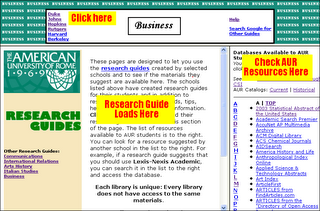
When you click on a research guide, you will see a page with three frames. The top frame gives access to the different guides at selected universities. When you select one, e.g. Johns Hopkins, it will load into the lower left frame. From here, you can read their recommendations, tips, etc. and if they suggest a database, you can compare it with our list, which is in the lower-right hand side. From here, you can go directly into the database.
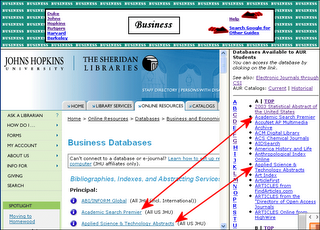 Here is an example of how it works. Johns Hopkins has suggested ABI/Inform, Academic Search Premier, and Applied Science & Technology Abstracts. You can check with our resources and discover that we have the last two, but not ABI/Inform.
If you want individual journals, you can search Electronic Journals through CSI, and there are links to our catalogs.
Finally, clicking on Help in the top frame reloads the first page back into the lower left frame, and you can also click on Search Google for Other Guides, which will do an automatic search for library guides on the topic you have selected.
The guides are always available when you click on Help in the Current catalog. Click here to work with them now.
The problem is that every library does not have access to the same materials. This is especially true today of the electronic databases, which contain thousands of journals. If two libraries subscribe to two different electronic databases, often they have access to completely different journals. This is why AUR's research guides are a little different. These research guides help you to find materials suggested by other libraries and then discover if those materials are available here.

When you click on a research guide, you will see a page with three frames. The top frame gives access to the different guides at selected universities. When you select one, e.g. Johns Hopkins, it will load into the lower left frame. From here, you can read their recommendations, tips, etc. and if they suggest a database, you can compare it with our list, which is in the lower-right hand side. From here, you can go directly into the database.
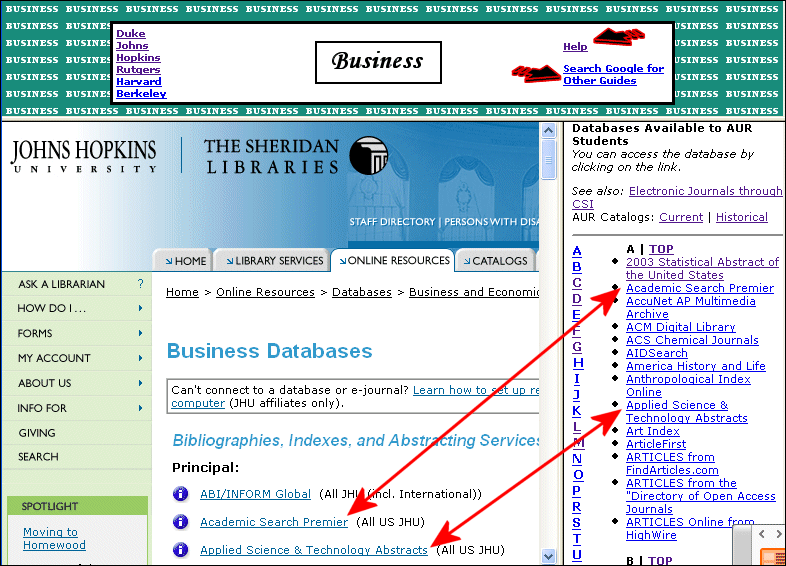 Here is an example of how it works. Johns Hopkins has suggested ABI/Inform, Academic Search Premier, and Applied Science & Technology Abstracts. You can check with our resources and discover that we have the last two, but not ABI/Inform.
If you want individual journals, you can search Electronic Journals through CSI, and there are links to our catalogs.
Finally, clicking on Help in the top frame reloads the first page back into the lower left frame, and you can also click on Search Google for Other Guides, which will do an automatic search for library guides on the topic you have selected.
The guides are always available when you click on Help in the Current catalog. Click here to work with them now.
Wednesday, October 04, 2006
Changes in the Library
There are several changes in the AUR Library from the previous semesters, including adding a blog. Here, we will try to inform our users on new services in the AUR library, new books or websites, or perhaps simply some interesting news.
The first important development is that the library has changed! There is a different classification for the new books: the Library of Congress Classification. The old books still have their previous numbers, but we will be reclassifying them. To find the books, now you need a Library Map, which shows where everything is.
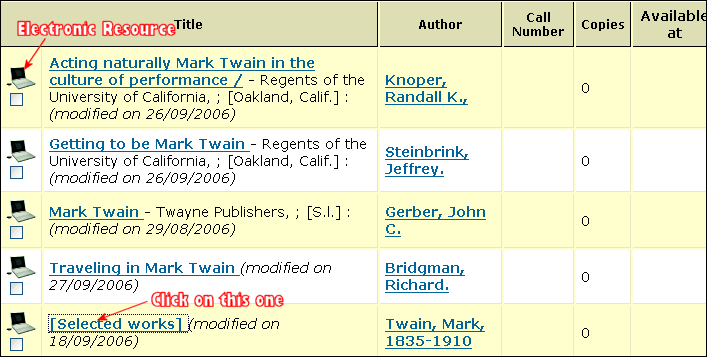 There is also a new catalog, which contains all books received after July 2006, and lots of electronic books. To see some of the differences, search Mark Twain in the old catalog, and you will find one book: The Innocents Abroad. Search for Mark Twain in the new catalog, and you will find five works, all electronic (you can tell by the little laptop computer), but in this case, look especially at the one named [Selected works].
When you look at the record, you will see a link
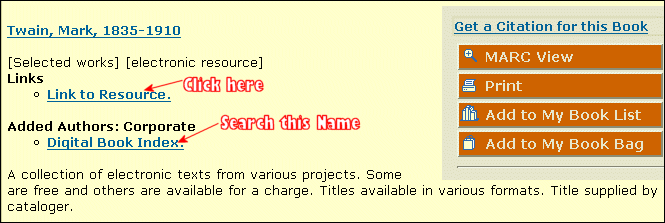 called: Link to Resource. When you click that link, you will go to another site, which has links to almost all of Twain's works, and almost all of them are available for free. Twain's books are not the only things that are available in this way--literally thousands of authors and tens of thousands of books are available if you search for Digital Book Index.
All we can ask is to please, please, please, be careful of printing these types of resources. Ask us in the library. We can all save a lot of trees if we work together.
There are a lot more changes. These are only the most visible ones. Many more posts will follow.
Subscribe to:
Posts (Atom)